💰 How to Receive Season Rewards
At the end of each season in Boku Saga, rewards are distributed based on the season's results.
You can receive rewards using the following methods.
Preparation
You will need to connect your wallet to the official website.
👛 Please refer to the official website for instructions on how to connect your wallet.
Receiving Procedure
[1: Select the season you want to receive rewards from] (#seasonselect)
[2: Check reward details] (#rewardcheck)
[3: Claim] (#claim)
[4: Receive rewards] (#receiving)
Step 1: Select the season you want to receive rewards from
Select the REWARD tab in WORLD to view the reward claim screen.
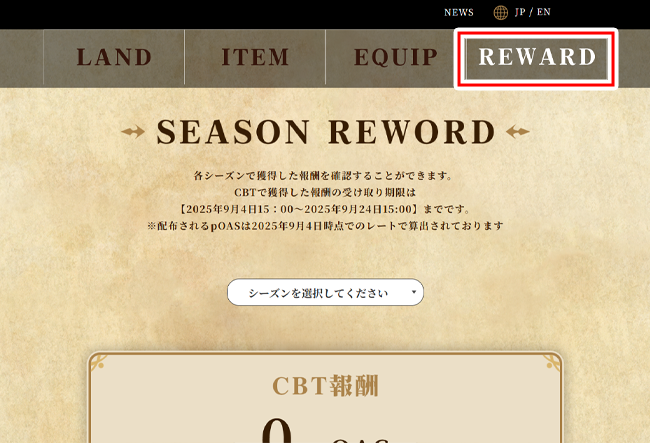
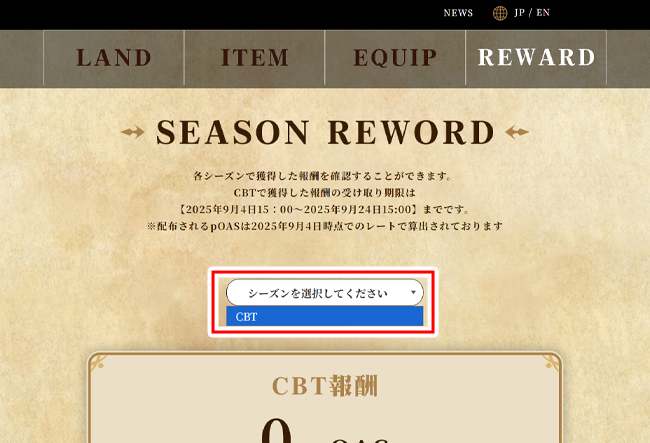
Select the "Select a Season" section and choose the season you wish to receive rewards for.
Step 2: Check Rewards
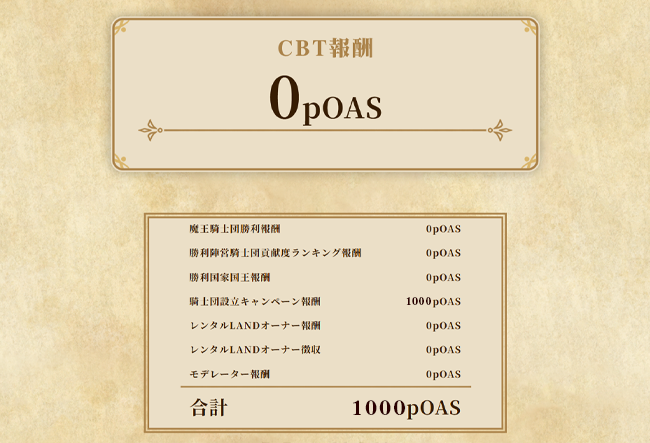
After selecting a season, the rewards earned for that season will be displayed.
The amount of pOAS you can receive and a breakdown of those rewards will be displayed.
Step 3: Claim
Once you've confirmed your reward details, submit your claim.
Select the "Claim" button at the bottom of the page. A confirmation dialog will appear, prompting you to select "Execute."
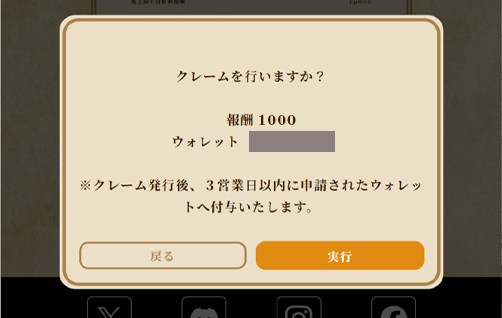
After submitting your claim, your reward will be credited to the requested wallet within three business days.
Step 4: Receive Your Reward
Once your reward is complete, a notification email will be sent to the account you registered on the official Boku Saga website.
Also, "Distribution Complete" will be displayed at the bottom of the page.
Please check that the rewards have been successfully added to your connected wallet.
*If you confirm that the rewards have not been successfully distributed,
Please contact Boku Saga support email address (support@bokusaga.net).